
YouTube content creation has become more competitive than ever. Creators today are expected to deliver high-quality videos, eye-catching thumbnails, fast editing, and consistent uploads. Handling all of this manually can quickly become overwhelming. That’s where AI Tools for YouTubers step in. These smart tools streamline video editing, automate repetitive tasks, improve content quality, and save valuable time, letting creators focus on strategy, growth, and audience engagement.
Whether you run a faceless channel, an educational series, or a vlog, the right AI Tools for YouTubers can boost your efficiency, enhance SEO performance, and make your workflow much smoother. In this guide, we’ll explore the Top 10 AI Tools for YouTubers in 2025 that are helping creators produce smarter, faster, and more professional content—without the usual stress of manual editing.
1- Descript – The Ultimate AI Video & Audio Editor
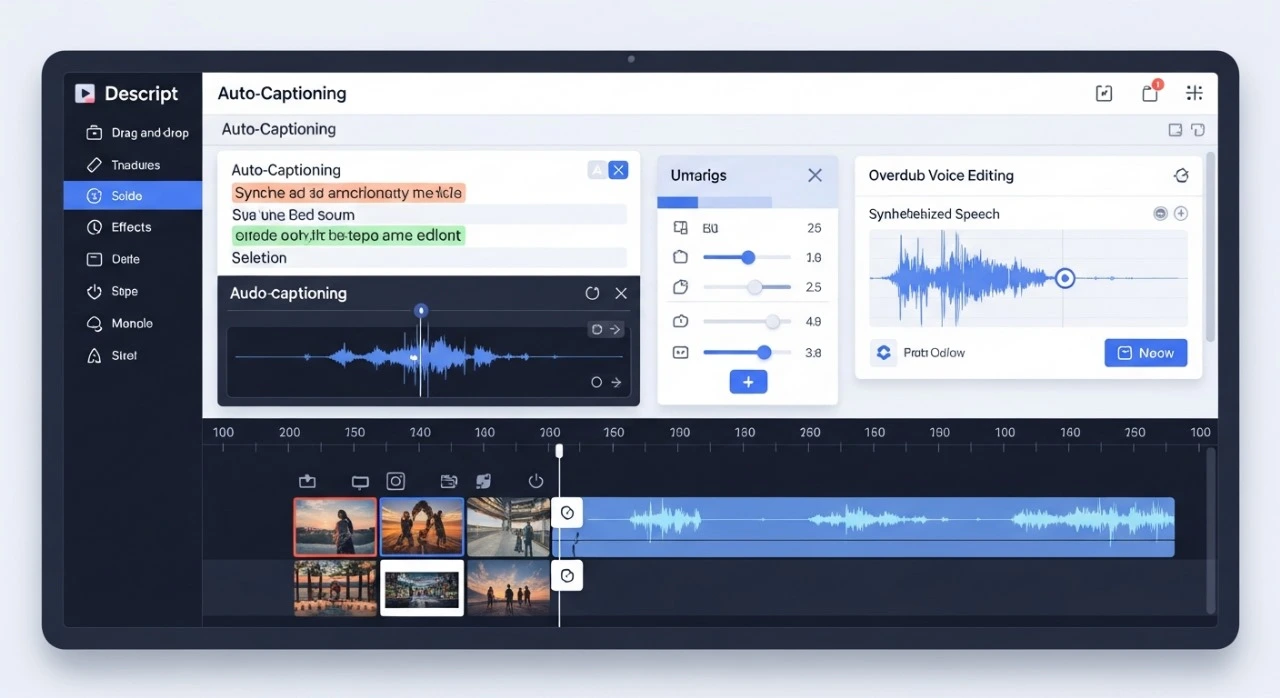
What is Descript?
Descript is a smart AI video and audio editor that makes editing feel as simple as editing a text document. Instead of manually dragging and cutting clips on a timeline, creators can just tweak the transcript to adjust their videos. For YouTubers, this saves hours of editing, reduces mistakes, and leaves more time for planning content and growing the channel.
What makes Descript even more valuable are its advanced features like AI voice cloning, Studio Sound, and automatic filler word removal. For instance, an educational vlog I worked on cut its audio cleanup time by more than half using Studio Sound. And for faceless channels, AI voice cloning can generate professional-quality narrations without hiring voice actors.
Key Features
-
Edit videos directly through the transcript
-
Studio Sound for instant audio enhancement
-
AI voice cloning for custom narrations
-
Multitrack editing & screen recording
-
Automatic filler word removal (ums, ahs)
Pros & Cons
Pros:
-
Cuts editing time by up to 50%
-
Perfect for educational, commentary, and talking-head channels
-
Significantly reduces post-production workload
Cons:
-
Pricing can be high for small creators
-
Advanced features may have a learning curve
-
AI-generated voices sometimes need minor tweaks for a natural tone
Pricing
| Plan | Features | Price |
|---|---|---|
| Free | Basic editing, limited features | $0 |
| Creator | Advanced editing + AI tools | $12/month |
| Pro | Full features, AI voice cloning, unlimited exports | $24/month |
Best For
-
Vloggers and talking-head YouTubers
-
Educational channels
-
Creators looking for fast, AI-assisted video editing
-
Faceless channels needing professional voiceovers
2- VidIQ – AI-Powered YouTube Growth Tool
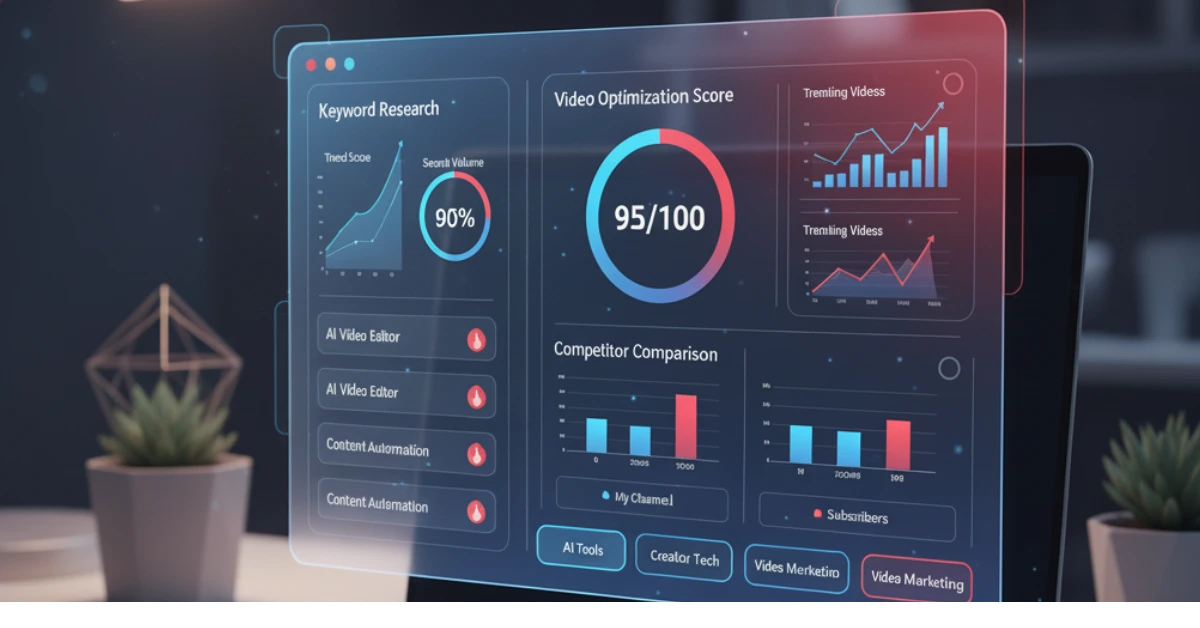
VidIQ is one of the most reliable AI Tools for YouTubers, helping creators optimize their channels with real-time keyword suggestions, trend alerts, and analytics. It guides you on what content performs best, increasing views, engagement, and subscriber growth.
What makes VidIQ even better is its actionable insights—competitor analysis, trending topics, and SEO scores for each video. For instance, a tech reviewer I follow boosted their channel views by 30% simply by using VidIQ’s recommendations for titles and tags. This makes it easier for creators to stay ahead in a competitive YouTube landscape.
Key Features
-
AI-powered title generator and SEO scoring
-
Daily trending keyword suggestions
-
Competitor tracking and analysis
-
Personalized growth recommendations
-
Real-time analytics dashboard
Pros & Cons
Pros
-
Understand audience demand quickly
-
Boost YouTube SEO effectively
-
Tailored growth suggestions for each channel type
Cons:
-
Free plan offers limited features
-
Some insights require experience to fully utilize
Pricing
| Plan | Features | Price |
|---|---|---|
| Basic | Limited SEO tools, daily keyword alerts | Free |
| Pro | Full SEO toolkit, trend alerts, analytics | $7.50/month |
| Boost | Competitor analysis, advanced reports | $39/month |
Best For
-
New and growing YouTubers
-
Educational and tutorial channels
-
Creators seeking actionable growth insights
3- Canva – AI-Enhanced Thumbnails & Graphics
What is Canva?
Canva is a versatile design platform and one of the best AI Tools for YouTuber to create eye-catching thumbnails, graphics, and branding assets. Its AI-powered suggestions, Magic Studio, and pre-designed templates make designing fast and easy—even for beginners.
What makes Canva even better is its ability to maintain brand consistency while generating professional visuals quickly. For example, lifestyle YouTubers can produce a week’s worth of high-quality thumbnails in under an hour without sacrificing creativity.
Key Features
-
AI image generation for custom visuals
-
Magic Studio for background removal and image enhancement
-
Thumbnail templates tailored to every niche
-
Brand kits for consistent design across videos
-
Simple drag-and-drop interface
Pros & Cons
Pros:
-
Beginner-friendly yet powerful AI design tools
-
Speeds up thumbnail and social media graphics creation
-
Maintains visual brand consistency
Cons:
-
Free plan has limited premium templates
-
Some AI features require a paid subscription
Pricing
| Plan | Features | Price |
|---|---|---|
| Free | Basic templates and images | $0 |
| Pro | Magic Studio, premium templates | $12.99/month |
| Enterprise | Team collaboration, brand kits | Custom |
Best For
-
Vloggers and lifestyle creators
-
Shorts creators needing consistent branding
-
Any YouTuber aiming for professional-quality visuals
4- Pictory – AI Tool for Turning Scripts Into Videos
What is Pictory?
Pictory is an AI tool that transforms scripts, blogs, or long videos into short, engaging content. It’s perfect for faceless channels or creators running multiple series who want to produce videos faster without sacrificing quality.
What makes Pictory even better is its ability to generate AI voiceovers, add captions automatically, and integrate stock footage seamlessly. For instance, a travel vlogger used Pictory to edit weekly clips in just 2 hours, which used to take over 6 hours manually. Similarly, an educational YouTube channel leveraged Pictory’s AI voiceover feature to cut narration time by 50% while keeping the content consistent and professional.
Key Features
-
AI voiceovers
-
Auto-captioning
-
Script-to-video creation
-
Stock footage integration
Pros & Cons
Pros:
-
Rapid content production
-
Excellent for faceless or automated channels
-
Reduces video editing workload
Cons:
-
Limited customization in visuals
-
AI voice may require minor tweaks
Pricing
| Plan | Features | Price |
|---|---|---|
| Free | Short clips, limited templates | $0 |
| Standard | Full AI features, captions | $19/month |
| Premium | Advanced scripts & voiceovers | $39/month |
Best For
-
Faceless channels
-
Multiple-video content creators
-
Social media short videos
-
Creators looking to save editing time without compromising quality
5- Opus Clip – AI for Shorts & Reels
What is Opus Clip?
Opus Clip automatically transforms long videos into short, shareable clips optimized for YouTube Shorts, Instagram Reels, and TikTok. This AI tool ensures creators never miss out on viral trends, helping their content reach wider audiences with minimal effort.
What makes Opus Clip even better is its AI highlights detection and dynamic framing. For example, a gaming YouTuber turned a 20-minute livestream into five engaging Shorts in under an hour, boosting their channel views by 40%. Similarly, a cooking channel repurposed tutorial videos into short recipe clips, which doubled engagement on Instagram Reels in just two weeks.
Key Features
-
AI highlights detection for the best moments
-
Auto-captioning for accessibility and better reach
-
Dynamic zoom & framing to focus on key actions
-
Virality scoring to optimize content performance
Pros & Cons
Pros:
-
Saves significant time creating short-form content
-
Expands reach across multiple platforms
-
AI identifies the most engaging moments automatically
Cons:
-
Limited manual control over framing
-
Subscription needed for unlimited exports
Pricing
| Plan | Features | Price |
|---|---|---|
| Free | Limited clips per month | $0 |
| Creator | Full AI editing & exports | $19/month |
| Pro | Unlimited exports + analytics | $49/month |
Best For
-
YouTubers creating Shorts or short-form content
-
Multi-platform content repurposing
-
Channels aiming to increase engagement efficiently
-
Creators looking to save editing time without losing quality
6- TubeBuddy – YouTube Optimization Companion
What is TubeBuddy?
TubeBuddy is an AI-powered companion that helps YouTubers optimize their channels with keyword research, SEO insights, and A/B testing for thumbnails. It’s one of the most trusted tools for creators serious about growing their audience efficiently.
What makes TubeBuddy stand out is its ability to give actionable insights for every video. For instance, a tech reviewer used TubeBuddy’s thumbnail A/B testing and saw a 25% increase in clicks in just two weeks. Similarly, a fitness channel optimized titles and tags using TubeBuddy’s keyword recommendations, which significantly improved their video ranking and discoverability.
H3 – Key Features
-
SEO score for each video to improve search rankings
-
Title generator for clickable and optimized headlines
-
A/B testing for thumbnails to find what resonates with viewers
-
Keyword research tailored to your niche
Pros & Cons
Pros:
-
Increases views through thumbnail testing and SEO optimization
-
Provides comprehensive guidance for growing channels
-
Useful for both small and large creators
Cons:
-
Free version is limited in features
-
Some tools may require experience to use effectively
Pricing
| Plan | Features | Price |
|---|---|---|
| Free | Basic SEO tools | $0 |
| Pro | Keyword research + analytics | $9/month |
| Star | Advanced A/B testing + insights | $19/month |
Best For
-
All YouTubers aiming for growth
-
Channels focusing on SEO, trends, and analytics
-
Creators who want actionable data to optimize content efficiently
7- ElevenLabs – Hyper-Realistic AI Voiceovers
What is ElevenLabs?
ElevenLabs is an AI-powered voiceover tool that creates hyper-realistic narration for YouTube videos. It’s perfect for faceless channels, storytelling videos, and any creator who wants professional-quality voiceovers without hiring voice actors.
What makes ElevenLabs especially useful is the ability to adjust tone, pace, and style, making the narration sound natural and engaging. For example, a history channel used ElevenLabs to narrate long-form documentaries in multiple languages, which saved hours of recording time while keeping viewers hooked. Another gaming channel created unique character voices for their streams, adding a professional touch without extra cost.
Key Features
-
Multilingual AI voices for global reach
-
Adjustable tone, pacing, and emotion
-
Voice cloning to replicate unique voices
-
Natural, human-like narration
Pros & Cons
Pros:
-
Produces professional-grade voiceovers without hiring actors
-
Supports multiple languages and styles
-
Easy to integrate with video editing workflows
Cons:
-
Premium voices require a paid subscription
-
Some voices may need minor adjustments for perfect natural tone
Pricing
| Plan | Features | Price |
|---|---|---|
| Basic | Standard AI voices | $0 |
| Creator | Premium voices + voice cloning | $15/month |
| Enterprise | Advanced customization & multiple voices | $50/month |
Best For
-
Faceless YouTube channels
-
Storytelling, tutorials, or narration-heavy content
-
Creators needing multilingual voiceovers
8- Notion AI – Scriptwriting & Research Buddy
What is Notion AI?
Notion AI is a versatile AI-powered assistant that helps YouTubers plan scripts, organize ideas, and generate high-quality content quickly. It’s also perfect in the list of ai tools for Youtubers and creators who need structure and efficiency in their workflow.
What makes Notion AI stand out is how it simplifies research and scriptwriting. For example, an educational channel used Notion AI to create detailed lesson scripts, reducing planning time from hours to just a few minutes. Another tech review channel leveraged Notion AI to outline product reviews, keeping content consistent and well-structured every week.
Key Features
-
AI-generated scripts for faster content creation
-
Topic ideation and brainstorming assistance
-
Notes and content planning for organized workflow
-
Automatic summaries for research-heavy content
Pros & Cons
Pros:
-
Saves hours of scriptwriting and planning
-
Keeps ideas organized and accessible
-
Ideal for educational, tutorial, and research-intensive channels
Cons:
-
Not designed for video editing
-
Full features require a paid subscription
Pricing
| Plan | Features | Price |
|---|---|---|
| Free | Basic AI notes | $0 |
| Pro | Advanced AI scripts | $8/month |
| Team | Collaboration & workflow tools | $15/month |
Best For
-
Educational and tutorial channels
-
Script-heavy YouTubers
-
Research-intensive content creators
9- Adobe Premiere Pro AI – Advanced Editing Assistance
What is Adobe Premiere Pro AI?
Adobe Premiere Pro AI brings AI-powered enhancements to the industry-standard video editor. It’s perfect for creators who want cinematic-quality videos without spending extra hours on repetitive tasks.
What makes it even better is the combination of traditional Premiere Pro tools with AI features like scene detection, auto-color correction, and generative fill. For example, a travel vlogger used AI scene detection to automatically split long footage into meaningful clips, saving hours of editing time each week. Another cinematic storytelling channel leveraged AI color grading to maintain a consistent visual style across multiple videos. So, this software has also very good rank in the list of ai tools for Youtubers.
Key Features
-
AI scene detection for faster timeline management
-
Auto-color correction for professional visual consistency
-
Noise removal for clean audio
-
Generative fill to quickly remove unwanted objects
Pros & Cons
Pros:
-
High production value with minimal extra effort
-
Maintains full creative control
-
AI reduces repetitive post-production tasks
Cons:
-
Expensive for beginners or small creators
-
Complex interface with a learning curve
Pricing
| Plan | Features | Price |
|---|---|---|
| Single App | Premiere Pro + AI features | $20.99/month |
| Creative Cloud | All Adobe apps + AI tools | $54.99/month |
Best For
-
Professional creators aiming for cinematic quality
-
Storytelling and travel vlog channels
-
Large-scale video production
10- Gemini (Google AI) – Research, Outlines & Metadata
What Gemini?
Gemini AI stands out the best position in the list of ai tools for Youtubers. It is an advanced research and planning tool that helps YouTubers organize their content efficiently. From finding trending topics to generating structured outlines and metadata, it ensures creators spend more time producing videos and less time figuring out what to make next.
What makes Gemini even better is its ability to provide multi-format responses, meaning you can get title suggestions, descriptions, tags, and full video outlines in minutes. For example, a cooking channel used Gemini to plan a 10-video recipe series in one afternoon, complete with SEO-friendly titles and descriptions, cutting their usual planning time by 70%.
Key Features
-
Quick research and topic discovery
-
AI-generated titles, descriptions, and tags
-
Structured content outlines for video planning
-
Multi-format AI responses for flexibility
Pros & Cons
Pros:
-
Saves hours of research and planning
-
Improves video SEO and metadata accuracy
-
Supports multiple content formats and channel types
Cons:
-
Advanced features require a paid subscription
-
Full functionality may take time to learn
Pricing
| Plan | Features | Price |
|---|---|---|
| Free | Basic research & outlines | $0 |
| Pro | Full metadata & AI suggestions | $14/month |
| Enterprise | Advanced integration & AI tools | Custom |
Best For
-
All types of YouTube creators
-
Metadata-focused workflows
-
Research-intensive and planning-heavy channels
Summary
Selecting the right AI Tools for YouTubers depends on your channel’s focus, workflow, and growth goals. For efficient editing, growth optimization, and branding, tools like Descript, VidIQ, and Canva are essential. Meanwhile, Pictory, Opus Clip, and ElevenLabs make content creation faster and more streamlined. Tools such as Notion AI, Adobe Premiere Pro AI, and Gemini help improve research, scripting, and overall production quality.
When used strategically, these AI tools save time, reduce repetitive tasks, and enhance content quality. Most importantly, they allow creators to focus on planning, creativity, and channel growth rather than getting bogged down in manual processes. With the right combination, YouTubers can produce smarter, faster, and more professional content consistently.
FAQs
Q1: Do AI Tools for YouTubers really help creators grow faster?
Yes! AI Tools for YouTubers automate repetitive tasks, streamline editing, improve thumbnails, and provide actionable insights. This saves time and allows creators to focus on content strategy, which ultimately speeds up channel growth.
Q2: Are AI video editors better than traditional editors?
Not always, but they are much faster and more efficient. Tools like Descript and Pictory let you edit videos, generate captions, and produce voiceovers quickly, which is ideal for creators juggling multiple uploads.
Q3: Can using AI tools for Youtubers cause monetization or copyright issues?
No. AI-assisted editing, thumbnail creation, and metadata generation are completely safe. Just make sure your videos follow YouTube’s community guidelines and copyright rules, and your monetization should not be affected.
Q4: Which AI tool is best for faceless YouTube channels?
For faceless channels, the combination of Pictory and ElevenLabs works best. Pictory converts scripts into video content, while ElevenLabs provides realistic voiceovers without hiring actors.
Q5: What’s the best AI tool for YouTube SEO?
VidIQ and TubeBuddy remain the top choices. They offer keyword research, competitor tracking, trend analysis, and SEO scoring, helping creators optimize their videos for maximum reach.
Conclusion
Using the right AI Tools for YouTubers can completely transform your content creation process. From faster editing with Descript to SEO optimization with VidIQ, these tools save time, reduce repetitive work, and help improve overall video quality. Whether you run a faceless channel, create educational content, or vlog regularly, the right AI toolkit makes your workflow smoother and more efficient.
By leveraging these tools smartly, you can focus more on creativity and strategy rather than tedious tasks. In 2025, YouTubers who embrace AI-powered tools and marketing automation will have a clear edge, producing professional, engaging, and optimized content consistently.